ChatGPT says your website is ready. Now what? How MADLAB // Publishing began
A client had built her website with ChatGPT and didn’t know how to get it online. That phone call is how MADLAB // Publishing began.
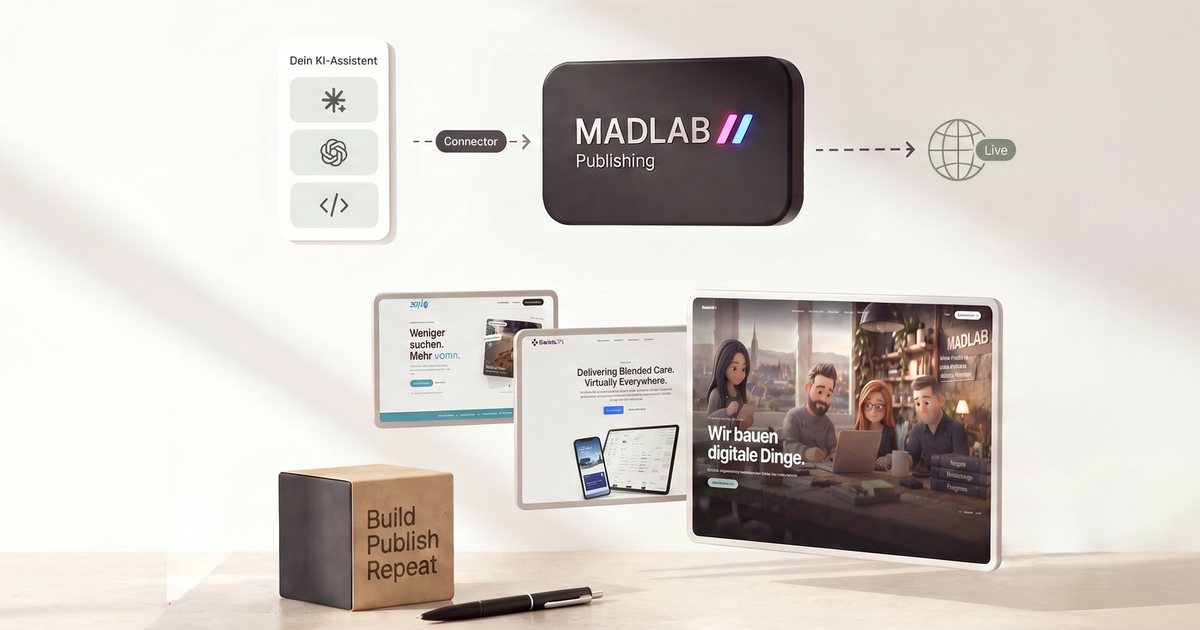
More and more people are building their own websites – not with a site builder, but in conversation with ChatGPT, Claude and the like. It works surprisingly well. Until the site is finished. Then the assistant says: “Your website is ready, you can publish it now.” And that is exactly where many people are stuck.
MADLAB // Publishing is the answer to that one sentence. Here is how it came about.
The phone call
One day a client called me. She said, almost word for word:
“I have a new website made with ChatGPT. ChatGPT said I can publish it now. I don’t know what he means. Can you help me?”
At first I smiled. Then I realised how spot-on that sentence was. She had done everything right: written the texts, picked the images, built a clean, good-looking website with the assistant. What she was missing was the last step – and it is not a small one.
What “publishing” actually means
For someone who works with websites every day, “publishing” is a word. For everyone else it hides a whole list of questions:
- Where does it go? A website needs a server, which means hosting. Which one? What does it cost? What has to be set up?
- At which address? Buying a domain, connecting it to the hosting, setting up an SSL certificate so the padlock shows in the browser.
- How do the files get there? FTP access, a program for it, the right folders. If you have never done it, you are facing a wall.
- And next time? The opening hours change. So back to the chat, copy code again, upload it again – and hope nothing breaks. There is no preview, and no way back.
The assistant is great at building. But it can’t put the website online, and it doesn’t know what is live right now. Between “the site is finished” and “the site is safely online” there is a gap. And that gap is why so many self-built websites never go online – or are never changed again after the first time.
The idea: no more CMS
We are a small digital agency in Wabern near Bern and run our own hosting with thousands of websites on it. Until then, our answer to “I want to maintain my website myself” was a content management system: a CMS with a login, updates and plugins. For five pages, that is a lot of baggage. The password is forgotten, the interface unfamiliar, the fear of breaking something big.
After that call we turned the question around. If people build their website in conversation with their assistant anyway – why still use a CMS? The assistant is the editor. All that is missing is what comes after building: a safe place the assistant connects to, which takes care of everything else.
That is how the idea of doing without a CMS from now on came about – what that means is explained on Website without a CMS. And that is how MADLAB // Publishing was born.
How it works
Your assistant connects to MADLAB // Publishing through what is called a connector (technically: MCP). That is where your website’s files live, and where everything happens that keeps a website safe:
- You say what should change – in your own words, in the assistant you already use.
- The assistant builds it and shows you a preview at its own address.
- You look at it and approve. Only then does the change go live – with hosting, domain and SSL, without you having to deal with any of it.
- Every change is a version. If you don’t like something, one click brings back the previous state.
The sentence “You can publish it now” finally means what it promises: you say yes, and the website is online. No FTP, no interface to learn. And the assistant does nothing with consequences without asking you.
The proof: our own website
Ideas come quickly. Whether they hold up only shows in real use. So we tried it on ourselves first: our own website madlab.ch was the proof of concept.
It was rebuilt from scratch in September 2026, without a CMS, built and maintained in conversation with Claude: 22 pages, five languages, videos that change with the time of day. Not a small experiment, but a real company website that several people work on.
Along the way we learned what is missing in everyday use. Images and videos don’t fit through a chat, so you need a secure upload. Several people work on the same website, so every version has to show who changed what. And an existing website should be taken over rather than rebuilt.
On 22 September 2026 it was clear: what works for us should work for everyone – including the client on the phone, without her needing an agency. On 1 October 2026 MADLAB // Publishing launched: sign up, connect your assistant, build, publish – with your own domain, hosting in Switzerland and the EU, and in four languages.
What MADLAB // Publishing can do today
- Build in conversation with the assistant you already have. We work with Claude every day ourselves and recommend it for getting started; ChatGPT and code editors work just as well. How to connect is explained in Connecting Claude and Connecting ChatGPT.
- Preview, versions and rollback for every change – see Versions and rolling back.
- Take over an existing website: the assistant fetches your current website page by page, see Taking over an existing website.
- Domain, SSL and hosting in Switzerland and the EU – or publishing to your existing hosting.
- Contact forms with spam protection, without an extra service.
- Visitor statistics without a cookie banner: counted without cookies and with a shortened IP address, on our own servers.
- Your website belongs to you: normal files, exportable at any time, the domain in your name.
What it deliberately is not
Not a site builder with templates to drag around. Not a content management system with a login for editors. And no email mailboxes – your mail stays with your mail provider. We do one thing, and we do it properly.
Who it is for
For everyone who has built – or wants to build – their website with an AI assistant and doesn’t know how to get it online. For freelancers, small businesses and associations who need a website but don’t want to learn a content management system. And for agencies and freelancers who look after many small client websites and want to let their clients make changes themselves.
If you are curious: building and previewing are free. You only pay once your website goes live. The plans are described in Plans and add-ons.
Frequently asked questions
I have already built my website with ChatGPT. How do I get it online?
Connect your assistant to MADLAB // Publishing and ask it to create the website there. It stores the files, shows you a preview, and as soon as you approve, the site is online. If you already have the files on your computer, upload them as a ZIP.
Do I need to know how to code?
No. You describe in your own words what should change. The assistant builds it, you check the preview and approve.
Which AI assistant do I need?
One that supports connectors (MCP) – for example Claude or ChatGPT, or a code editor with AI. You use your existing subscription; you don’t need an additional one.
What does MADLAB // Publishing cost?
Building and previewing are free, and on the free plan your website already runs at its own address, with a small note at the edge of the page. You only pay when your website should go live without the note and under your own domain.
Where is my data?
On servers in Switzerland and the EU, operated by MADLAB in Wabern near Bern. Visitor statistics run on our own servers and are not passed on to anyone.
Can I take over my existing website?
Yes. You tell your assistant which website is yours, confirm it once with a file or a DNS entry, and it fetches the site page by page.